
DNS Tutorial part 2
Authoritative DNS infrastructure
In part one of our DNS tutorial described how the domain name space looked and worked. We explained how everything is connected, with delegation records in parent zones pointing resolvers to the next step on their journey to find the authoritative servers for a specific zone.
In this part, we will examine how different authoritative DNS infrastructures are built and how they work.
Terminology
Many words and abbreviations are used in DNS lingo, which can be a bit tough to comprehend. This is why we have created a DNS Terminology page where the most commonly used abbreviations and nomenclature are explained.
Even so, for the sake of clarity, there are two terms that must be understood before we proceed.
The Master (or Primary, or Primary Master) is the only place where the zone content can be updated, while the Slave servers (Secondaries) contain read-only copies of the zone content.
Note
Primary = Master, Secondary = Slave
Originally, the terms Primary and Secondary were used to identify the two roles a DNS can have. This terminology was abandoned due to its misleading and misunderstood names. A common misconception was that only the Primary DNS would respond with authoritative data, and the Secondary DNS server would respond with non-authoritative data, which is untrue. Master and Slave were introduced to end the confusion.
In the last few years, due to political reasons, the terms Primary and Secondary has once again become popular.
Building authoritative DNS infrastructure
The essential parts of authoritative DNS infrastructure are very straightforward. We will start with the bare minimum and work our way forward. But let’s establish a couple of fundamental security guidelines:
- Always, as a security minimum, ensure that traffic from the Internet can only reach your DNS servers on application port 53, both over UDP and TCP.
- Always ensure the servers have the correct time, or at least keep the DNS servers at the same time if the correct time is unachievable.
We will not discuss specific configuration statements for certain types of DNS software, but the suggested configuration should be available from all major DNS vendors.
Basic DNS setup
This is a basic setup with a Master DNS, from which we edit our zone files and two Slave DNS servers. The Master and Slave servers are all listed in the NS resource records. The DNS protocol scrambles the order of the DNS servers in every query response, which ensures that the query load on each authoritative DNS server is fairly equal.
This infrastructure is quite easy to maintain but has a few drawbacks. The main drawback is that the Master DNS is equally exposed to the Internet as the Slave DNS servers, and since the Master DNS is the source of origin for our domains, we might want to increase its security a bit.
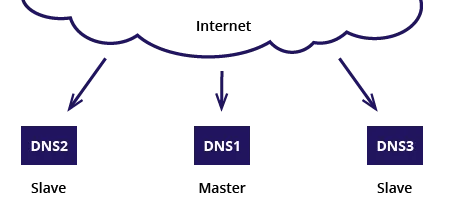
Example 1
NS RR set:
example.com. IN NS dns1
example.com. IN NS dns2
example.com. IN NS dns3
SOA Master name: dns1
Hidden Master concept
By excluding the Master’s name from the NS resource records, we create a “hidden master” configuration. By placing the Master DNS behind a firewall (illustrated in the picture below by the red dotted line) and setting up rules that only allow DNS traffic to the Master from each of its Slaves, we increase the security and lower the Master’s exposure.
Note that the Master DNS is still visible in the SOA resource record by the Master Name.
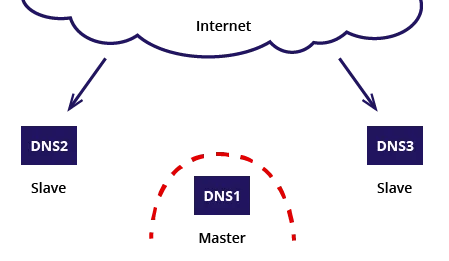
Example 1
NS RR set:
example.com. IN NS dns3
example.com. IN NS dns3
SOA Master name: dns1
To completely hide the DNS Master from Internet exposure, we must replace the SOA Master name with one of the Slave servers, as shown in Example 2.
This will hide the Master (who still needs a host record), but it will create a new problem that may need to be dealt with: Dynamic DNS update requests. We will come back to that later in this tutorial.
Example 2
NS RR set:
example.com. IN NS dns3
example.com. IN NS dns3
SOA Master name: dns2
Multiple masters designs
Multiple Masters are usually implemented to increase resiliency. The downside is that, in many circumstances, they also add complexity. This can be tricky to solve because security degradation often follows when complexity increases.
Below are a few successful designs where multiple masters are used.
Microsoft AD
As far as Multi-master concepts go, the Microsoft AD is by far the most implemented multi-master DNS concept. Microsoft DNS servers are rarely seen on the Internet, though. Microsoft defaults a DNS server on each Domain Controller (you can opt out if you wish), using AD synchronisation instead of zone transfers to keep every master DNS in sync. As you probably know, edits to any Domain Controller are immediately replicated to all other DCs. Take note that in a Microsoft DNS implementation, there are no real Slave servers.
In most implementations, the multiple masters also serve as recursive resolvers.
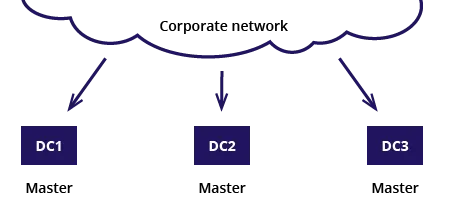
NS RR set:
ad.example.com. IN NS dc1
ad.example.com. IN NS dc2
ad.example.com. IN NS dc3
SOA Master name: dc1/dc2/dc3
depending on which DNS responding to the query.
A simple Multi-master concept
The most straightforward approach with a multi-master concept is to have two identical master servers that keep in sync by an “out-of-band” protocol. Most of these instances use a database backend to enable editing on both master servers simultaneously. The slaves can use both of these servers to transfer the zones.
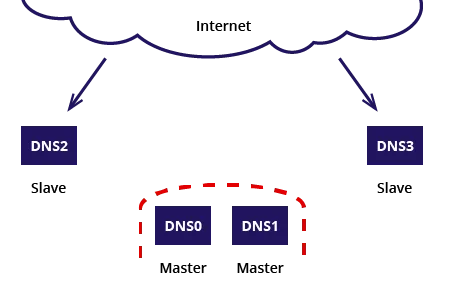
NS RR set:
example.com. IN NS dns2
example.com. IN NS dns3
SOA Master name: dns0/dns1 depending on setup.
A more complex Multi master concept
The DNS community has always recommended distributing public name servers across multiple AS (Autonomous Systems). When outsourcing the DNS service, chances are that the service provider only resides inside a single AS, so it has become prudent to use two or more DNS service providers. Since a service provider usually provides its own master accompanied by its own slaves, you might end up with a multi-master/multi-slave infrastructure. In this type of setup, the different master/slave infrastructures operate independently and provide a high degree of availability but with an increased complexity keeping the different infrastructures in sync.
Since the two (or more) infrastructures operate independently, the SOA serial numbers will probably differ between them.
Of course, there are ways to deal with these kinds of situations so that you end up with only one master, which is preferable.
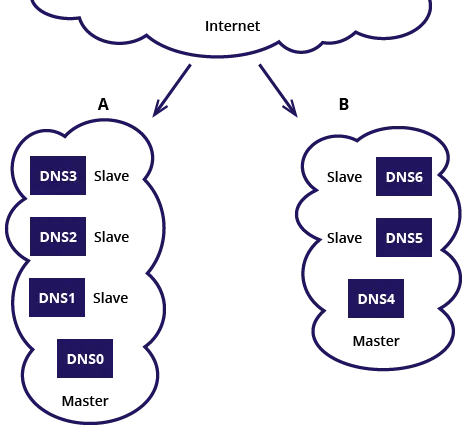
NS RR set:
example.com. IN NS dns1
example.com. IN NS dns2
example.com. IN NS dns3
example.com. IN NS dns5
example.com. IN NS dns6
SOA Master name (A): dns0
SOA Master name (B): dns4.
Conclusions
It really doesn’t matter which architecture you run with—it might be that your architecture is a combination of two of the above architectures—as long as you understand how it works and the security measures provided are up to standards.
Dynamic DNS and Hidden masters
As we established in the ingress of this tutorial, the Master server is where the zone content can be updated. Even though dynamic DNS requires a complete chapter of its own we need to briefly address how dynamic DNS updates work in a hidden master design.
In order for a dynamic DNS update to work, the clients update request must be able to reach the hidden master to register its records. But how does a client complete a dynamic registration if the master is hidden?
When a hidden master concept is used one (or more) of the Slave servers needs to be configured to act as forwarders for the dynamic update request. So the client sends the update request to one of the “visible” name servers which in turn forwards the request to the master.