

Securing email with DNS – part 1
In this first part of our series we will cover the standard Sender Policy Framework or SPF. SPF is part of the DMARC standard package (Domain-based Message Authentication Reporting and Conformance). SPF can be used alone, but to ensure the best possible security for email, SPF should be used together with both DKIM and DMARC. The Sender Policy Framework may appear difficult to wrap your head around, but once you’ve got the understanding of the basics it is quite simple. Our recommendations is that you learn these standards and implement them on all your domains.
Note: We’re going to use the abbreviation MTA throughout this series. MTA is short for Mail Transfer Agent and is essentially any type of email sender or email receiver.
SPF
The Sender Policy Framework is a standardised mechanism that allows the receiving MTA to authenticate the email sender. The SPF resource record is presented in the DNS for the sender domain and is essentially an IP address list of approved mail senders. When establishing an email exchange the sending MTA presents itself by name, from where the email is sent and its intended recipient. This is known as the email envelope HELO, MAIL FROM and RCP TO fields and is illustrated in the picture below.
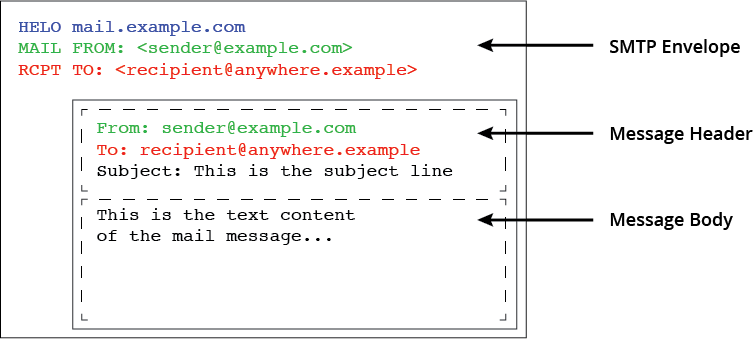
The receiving MTA looks up the envelope domain’s SPF resource record and compares the sender’s IP address with the provided IP list from the SPF record. If a match is found, the sender’s identity is authenticated and the mail exchange can continue.

Without the SPF record anyone can send emails for the domain.
Several experimental standards were tested from 2004 onwards to counter spam, but it wasn’t until 2014 that the IETF published SPF as a proposed standard in RFC 7208.
SPF record structure and syntax
Every Internet standard requires a strict structure, and the SPF standard is no exception. All SPF records published in the DNS are required to follow the rulesets set by the IETF in the RFC 7208 document. The SPF record is presented in the DNS as a specifically structured TXT resource record containing elements called Mechanisms and Modifiers. These elements set the rules of how the SPF record is to be interpreted by the querying MTA.
Before the MTA can use an SPF record, all mechanisms, modifiers and macros have to be expanded into a list of IP networks and addresses.
SPF Mechanisms
The SPF record must always start with the version identifier, and since only one version is available, the identifier “v=spf1” should always be used. The version identifier is followed by one or more mechanisms and must always finish with the catch-all mechanism “all“.
The SPF record is generally executed left to right. If the sender’s IP address is a match at any point, the mail sender is accepted and the email is passed. As in everything else Internet-related, there are exceptions to this rule.
Some mechanisms will require additional name lookups. The SPF standard states that the entire SPF record must be resolved within 10 name lookups; otherwise it will automatically fail. Below is a list of available mechanisms and their use.
ALL
The “all” mechanism is a test that always matches. It must be placed at the end of the record and provide an explicit default action. The “all” mechanism is used with qualifiers to form a default policy.
+ALL
Pass. Unmatched sending MTA’s are allowed to send emails on behalf of the domain.
-ALL
Fail. MTA’s that fail authentication are not allowed to send emails on behalf of the domain. The sending MTA is rejected.
~ALL
Soft Fail. MTA’s that fail authentication are allowed to send emails on behalf of the domain, but the mails are marked suspicious and are sent to the spam folder.
?ALL
Neutral. Emails neither pass nor fail.
A
The A mechanism matches both A and AAAA records. The lookup result must match the IP of the sender.
IP4
This mechanism tests whether the sender IP is contained within a given IP network. IP addresses are entered as CIDR networks. If CIDR length is omitted, it is taken as a /32
IP6
This mechanism tests whether the sender IP is contained within a given IP network. IP addresses are entered as CIDR networks. If CIDR length is omitted, it is taken as a /128
MX
Matches if the IP of the sender matches the domains MX records.
PTR (do not use)
This mechanism test whether the DNS reverse mapping for the sender IP exist and correctly points to a host within the particular domain.
EXISTS
This mechanism is used to construct an arbitrary domain name that is used for a DNS A record query. It allows for complicated schemes involving arbitrary parts of the mail envelope to determine what is permitted.
INCLUDE
The include mechanism requires the receiving server to resolve the included records into IP networks before it can be evaluated. The include mechanism makes it possible to maintain SPF records across multiple administrative domains.
Modifiers
Modifiers are optional to use. A modifier may only appear once in an SPF record. Unrecognised modifiers are ignored.
REDIRECT
The redirect modifier links to a policy in another domain.
EXP
Explanation. Used to provide an explanation string for rejected messages.
SPF Macros
When evaluating an SPF policy record, specific character sequences are intended to be replaced by parameters of the message or of the connection. These character sequences are referred to as macros. Macros are not widely used but can, in some instances, provide the flexibility necessary to craft specialised SPF records to solve operational challenges. To identify a macro expansion letter, the % is used with a special letter inside {}.
Below are the more commonly used macros and their use.
%{s}
The “s” represents the sender’s email address.
%{l}
The “l” is used to denote the local part of the sender’s email address.
%{o}
The “o” is a representation of the sender’s email domain.
%{d}
The “d” represents the sender’s authoritative domain. In most cases this is the same as the sender’s domain but it may differ.
%{i}
The “i” is used to extract the sending MTA’s IP address.
%{h}
The “h” represents the hostname the sending MTA specified in the HELO or EHLO command when setting up the email connection.
Additional macro definitions can be found in RFC 7208.

SPF DNS lookup limit
Every time an email sending request reaches an MTA, the receiving MTA must look up the sender domain’s SPF record in the DNS. To prevent the receiving MTA from spending too much time looking up an SPF record, the maximum number of DNS lookups is set to 10 before the SPF record fails.
All Mechanisms and Modifiers, except the IP4, IP6, all and EXP, count against the limit, so make sure to stay within the limit; otherwise the SPF check will automatically fail.
SPF DNS record
The SPF record is published in the DNS as a TXT (text) record. Originally a specific DNS record type (SPF) was suggested in RFC 4408 using the same format as the TXT record but never really gained much adoption. The SPF resource record was discontinued in RFC 7208 due to lack of implementation and support.
SPF records can also be found in DNS as CNAME records, providing the domain owner an additional way, besides the REDIRECT Modifier, to present the policy in another domain.
SPF record examples
Below we have compiled a list of examples you are likely to find. The list is far from complete but represents examples that we have come across on multiple occasions.
"v=spf1 -all"
This record is commonly used to prevent anyone sending email on behalf of the domain. We strongly urge you to implement this record in all of your domains you don’t use as mail senders to prevent spam and other unsolicited emails.
"v=spf1 ~all"
Similar to the above record, it belongs in domains that are not supposed to act as email senders. The “~” (tilde) sign will trigger a “Soft fail” and send the emails to the spam folder.
"v=spf1 mx -all"
This SPF record will allow the hosts that are resolved from the MX resource record of the domain found in the Envelope MAIL FROM field.
"v=spf1 mx:example.com -all"
This SPF record will allow the hosts that are resolved from the example.com domains’ MX resource record.
"v=spf1 a:mail.example.com -all"
This SPF record will allow the IP addresses that are resolved from the www.example.com A and AAAA resource records.
"v=spf1 ip4:192.0.2.0/24 -all"
This SPF record will allow mail senders from the 192.0.2.0/24 IPv4 subnet.
"v=spf1 ip6:2001:db8::/64 -all"
This SPF record will allow mail senders from the 2001:db8::/64 IPv6 subnet.
"v=spf1 include:_spf.examlpe.com -all"
This SPF record will allow mail senders that are resolved from the _spf.example.com resource record. Note that the _spf.example.com record in turn could contain additional SPF Mechanisms, that might require additional lookups to be fully resolved.
SPF record composition
The examples above are easy to understand, but in reality an SPF record is usually a combination of one or more of the examples above. It is not uncommon that SPF records will contain a mix of the above mechanisms as in the following example:
"v=spf1 mx ip4:192.0.2.0/24 ip6:2001:db8::/64 include:_spf.example.com ~all"
When reading complex SPF records, break them down to their individual Mechanisms to find which networks and hosts are allowed to send emails from that individual domain.
SPF record monitoring
With DNSmonitor you can monitor the integrity and availability of your SPF records. The SPF record in the domain apex is monitored by default with the Mail package added to the Basic plan or, of course, with the Premium plan. SPF records below the domain apex can be monitored with the SPF record check configurable for all plans.
Securing email with DNS – part 2
In part 2 we will check out the Domain-key Identified Mail, DKIM and the Domain-based Message, Authentication, Reporting and Conformance, DMARC standards. Stay tuned!